 OrderPeek
A list of orders that need attention
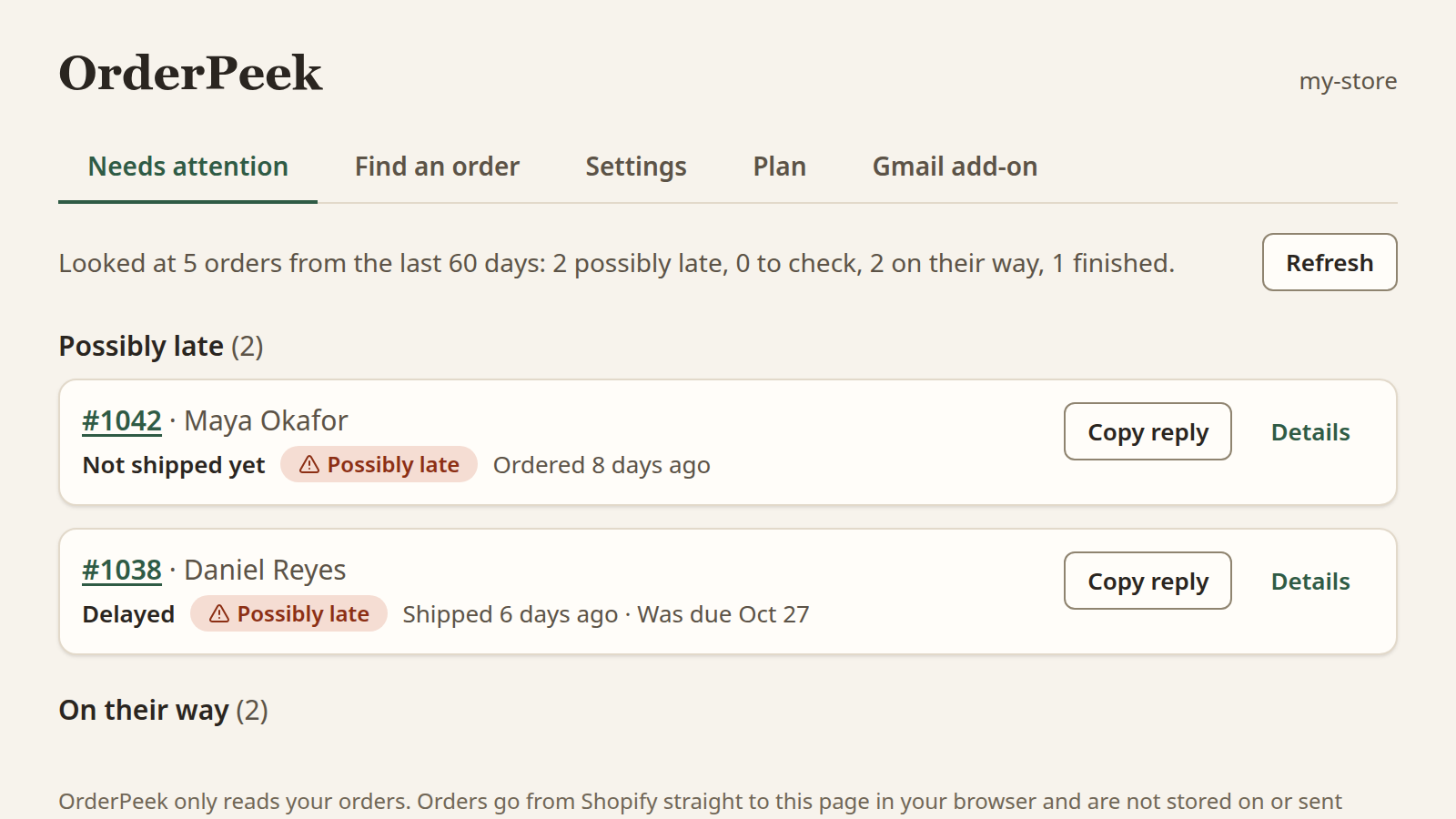
Orders that have not shipped after the limit you set, or that the carrier reports as delayed, with the oldest first. A Possibly late flag marks each one.
For Shopify merchants who get asked “where is my order?”
OrderPeek lists the recent orders in your store that look late or stuck, finds any customer’s order by email, name or order number, and fills in a reply with the delivery status and tracking. It works inside your Shopify admin, with an optional add-on for Gmail.
Free plan available · Read-only access to your orders · Order data is not stored on our servers
Approve read-only access to customers and orders, nothing else. There is no separate account and no sign-up.
Needs attention lists recent orders that look late or stuck. Find an order searches by email, name or order number.
Pick a template. The customer’s name, order number, tracking link and delivery status are filled in. Copy it into your reply, or insert it with the optional Gmail add-on.
The answer comes first: where the order is, and whether it is late.
Orders that have not shipped after the limit you set, or that the carrier reports as delayed, with the oldest first. A Possibly late flag marks each one.
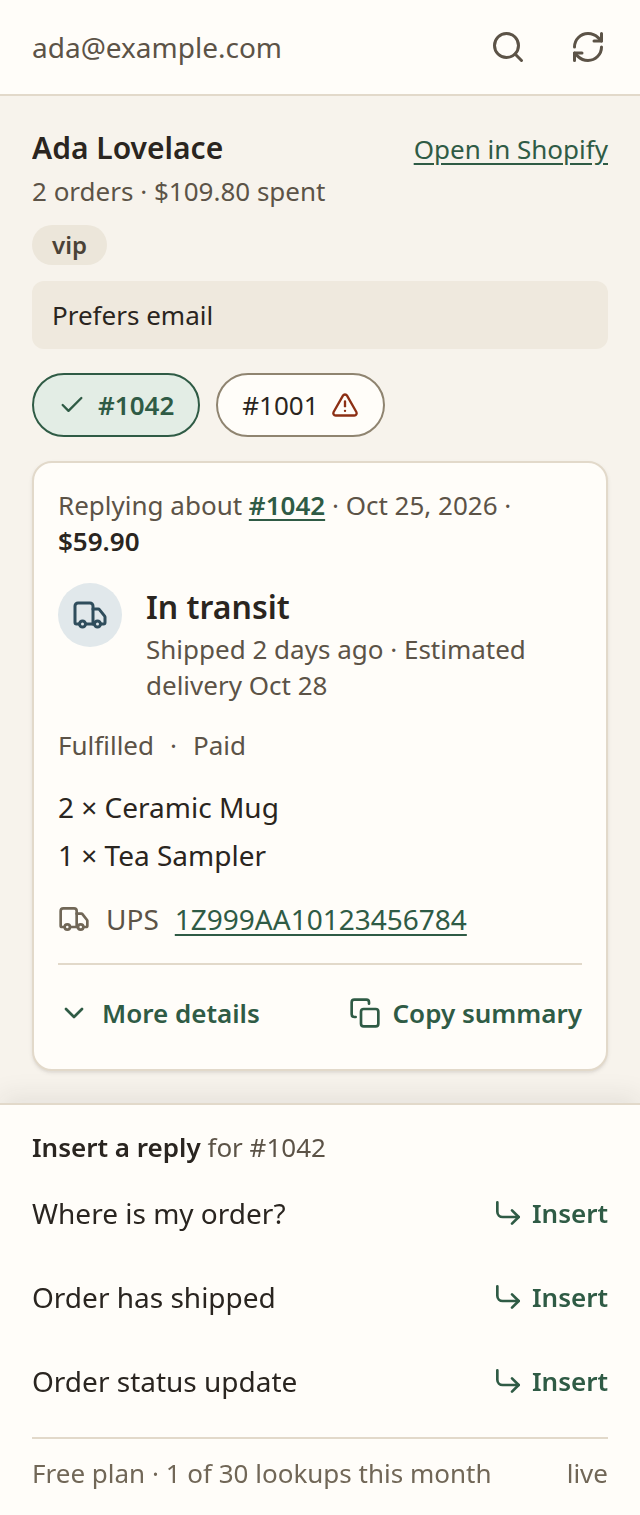
See whether a parcel is in transit, out for delivery, delayed or delivered, with the estimated delivery date when Shopify has one, and a link for every tracking number.
Search by email, name or order number, including guest checkouts. The customer card shows how many orders they have placed and how much they have spent.
Items, payment and fulfillment status, shipping address and a link to open the order in Shopify. Copy summary puts a plain-text summary on your clipboard, ready for a chat or ticket.
Seventeen variables, including customer name, order total, items, shipping address, tracking number, delivery status, estimated delivery and your sign-off. If something can’t be filled, it stays visible so you notice before sending.
Your late limits, sign-off and templates are saved in your Shopify store, not on our servers, and are the same wherever you use OrderPeek.
Optional
If you answer customers in Gmail, the Chrome add-on shows the same order in a side panel next to each customer email and inserts a template into your reply. Nothing is sent until you send it.
read_customers and read_orders.One thing to know about the Gmail add-on: the library that lets it appear inside Gmail (InboxSDK) sends its own usage and error reports to its operator, which can include a hash of your Gmail address. We never give it your customers’ data. Details are in the Privacy Policy.
Start free. Upgrade when your inbox outgrows it.
$0Free to install and use
In the Gmail add-on, a lookup is counted only when it finds a customer or an order. Newsletters and unknown senders are free.
$9.00 / month after a 7-day free trial
Billed through Shopify. Change or cancel any time on the plan page in your Shopify admin.
No. OrderPeek works inside your Shopify admin. Chrome and Gmail (or Google Workspace) are only needed for the optional add-on.
Not yet. The add-on works with Gmail only.
No. It only reads. That keeps the permissions small and your store safe.
By default Shopify lets apps read only the last 60 days of orders. If you need older orders, tell us at sudarshanhosalli90956@gmail.com.
From Shopify to your browser, and nowhere else we control. We don’t store it. Read the Privacy Policy and the Data Processing Agreement for the details, including the one third-party library to be aware of.
Change or cancel your plan on OrderPeek’s plan page in your Shopify admin, or uninstall the app. Shopify applies a downgrade to Free at the end of the billing period.
No. OrderPeek is built for people who answer customer questions straight from their Shopify admin or Gmail.
Questions? sudarshanhosalli90956@gmail.com